From WordPress to a Faster, Safer Custom Site: The Flamingo Medical & Wellness Case Study
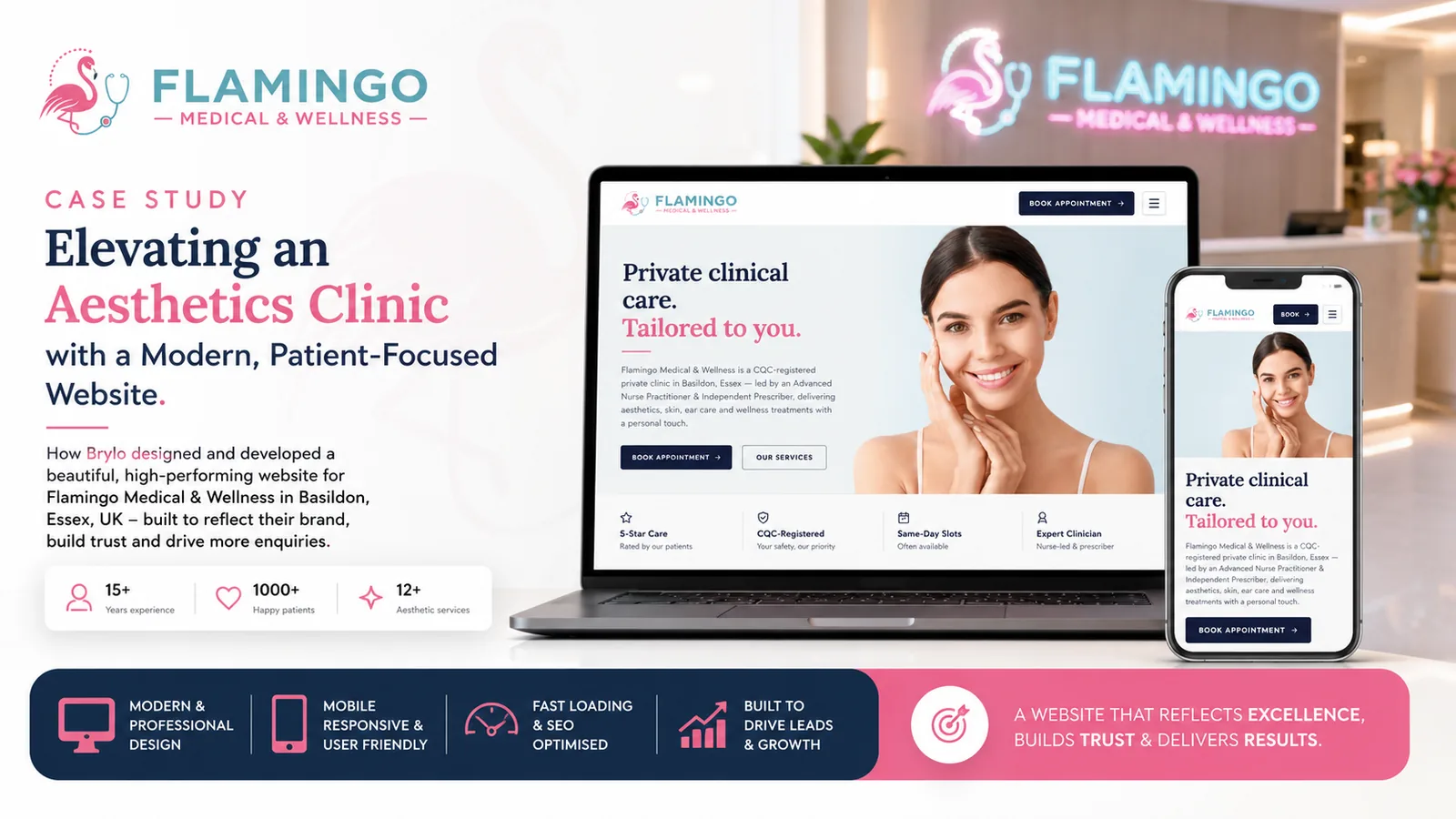
When Flamingo Medical & Wellness came to us, their website was working against them. It ran on WordPress with the Amelia booking plugin, and it was slow, fragile, and a monthly chore to keep secure. We rebuilt it as a custom, database-free website on Hostinger, and moved every appointment into Google Calendar, where the clinic already spent its day. The result is a site that loads in under a second, has almost nothing to attack, and costs less to run. This is the full story: the stack we chose, how booking works now without a plugin, the security model, and the before-and-after numbers.
Who is Flamingo Medical & Wellness?
Flamingo Medical & Wellness is a CQC-registered private clinic in Basildon, Essex, led by an Advanced Nurse Practitioner and Independent Prescriber. It is a proper clinical service, not a high-street salon. The clinic offers aesthetics, skin treatments, ear care, weight management, IV therapy and travel health, and the site has to do two jobs at once: reassure a cautious patient that this is safe, regulated care, and let that patient book a consultation without friction.
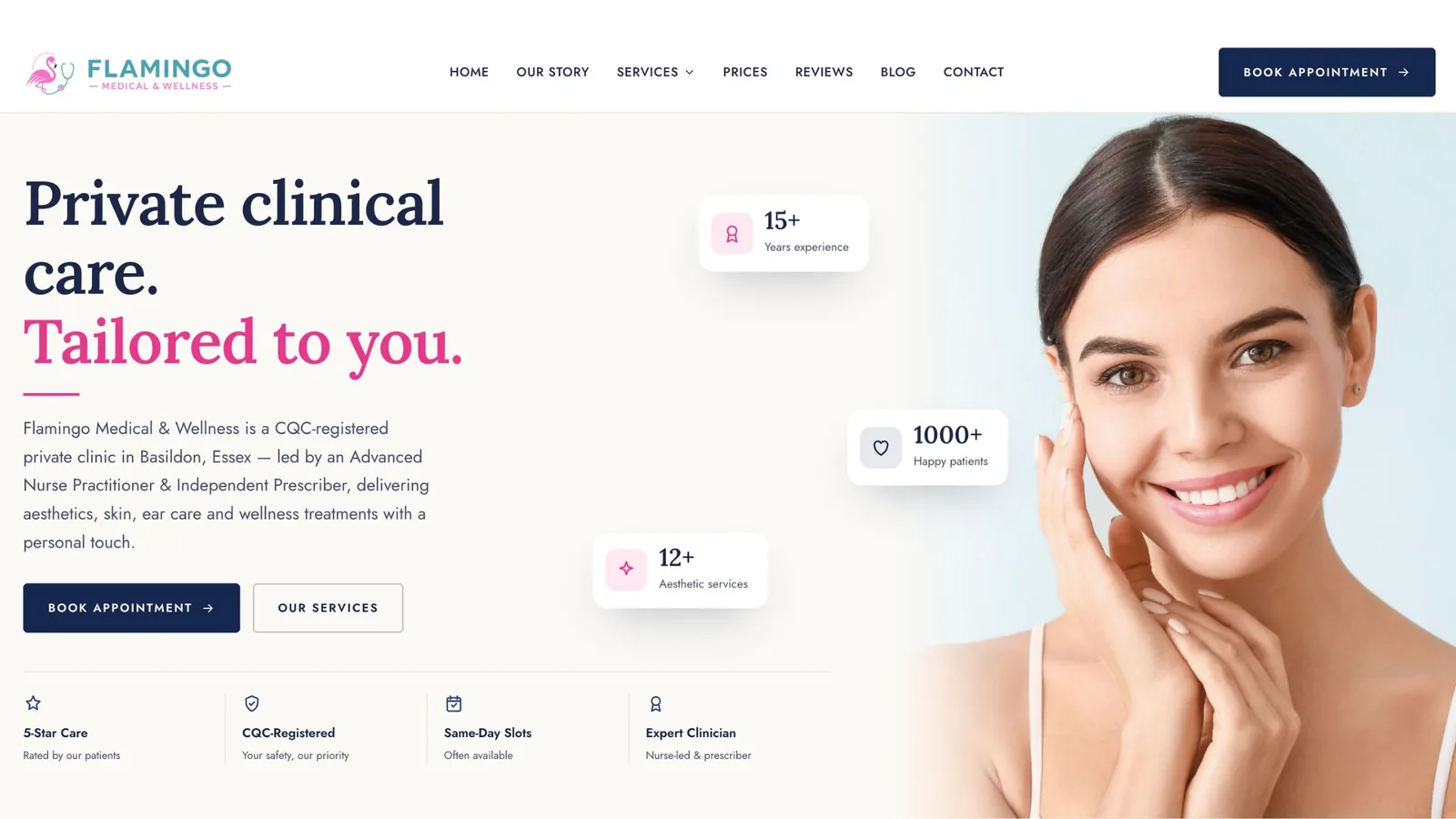
The rebuilt Flamingo Medical & Wellness homepage, built to turn visitors into booked consultations.
That second job is where the old site kept tripping. A private clinic lives or dies on booked consultations. Every second of load time, every clunky calendar step, and every “sorry, the booking form is down” is a lost patient who quietly goes to a competitor instead. For a regulated healthcare provider, the site also carries a trust burden that a shop selling t-shirts simply does not have. It has to feel as careful as the clinic itself.
So when we scoped the rebuild, “make it prettier” was never the brief. The brief was: make it fast, make it safe, and make booking effortless for both the patient and the front desk.
What was wrong with the WordPress and Amelia setup?
The short version: the old stack asked the clinic to run a small piece of server software, a database, and a stack of plugins, purely to publish what is essentially a brochure with a booking button. That is a lot of moving parts for a five-page clinic site, and every part was a cost.
Here is what that looked like day to day.
- It was slow. WordPress themes and plugins load their own CSS and JavaScript whether a page uses them or not. Amelia alone pulls in its own scripts, styles and calendar assets on every page that touches booking. Stack a page builder on top, add a slider, a cookie plugin, an SEO plugin, and a security plugin, and a simple page ends up shipping several megabytes and making dozens of requests before a patient sees anything.
- It was a security liability. Every plugin is code written by a third party with permission to run on your server. Patchstack’s State of WordPress Security 2023 report attributed the overwhelming majority of new WordPress vulnerabilities that year to plugins and themes rather than the core software. Sucuri’s hacked-website reports have for years found WordPress to be the most frequently compromised CMS, usually through outdated plugins. A booking plugin is an especially juicy target, because it sits next to patient contact details.
- It needed constant babysitting. WordPress core, the theme, and every plugin publish updates on their own schedule. Skip them and you drift into known vulnerabilities. Apply them without care and an update can break the booking form on a Friday night. Either way, someone is on the hook every month.
- Booking lived in two places. Amelia keeps its own appointments in the WordPress database. The clinic also runs its day in Google Calendar. That meant either a fragile sync, or staff re-keying appointments between two systems and hoping they matched. Double entry is where double bookings come from.
- It cost more than it should. Managed WordPress hosting that can cope with plugin overhead, plus a premium booking plugin licence, plus the maintenance time, added up every month for a site that, in the end, mostly shows opening hours and a “book now” button.
None of this is a knock on WordPress. It is a superb tool for the right job. The point is that this clinic was paying the full price of a database-driven CMS while using almost none of what a CMS is actually for. We covered where that line sits in our guide to choosing a UK web development and design studio; this project is that principle in practice.
What did the clinic actually need?
We stripped the requirements back to what a private clinic genuinely needs from its website:
- Fast, trustworthy pages that work on the phone in a patient’s hand.
- A booking flow that drops the appointment straight into the clinic’s real calendar.
- As little to hack, patch, and maintain as possible.
- A lower, more predictable monthly cost.
Notice what is missing. There is no requirement for the clinic owner to log into a CMS and edit pages daily. Clinic content changes rarely: a new treatment now and then, updated pricing, seasonal travel-health notes. That single fact is what makes a database-free build the right call here, and it is the decision everything else follows from.
Why we built it without a backend or database
Most brochure sites do not need a database. They need to show the same carefully written pages to everyone who visits. WordPress builds those pages fresh from a database on request (or from a cache that then needs managing). We took the opposite approach and built every page ahead of time, as plain HTML, so the server has nothing to compute when a patient arrives. In the industry this is called a static, or prerendered, site.
We built it with Next.js and prerendered the whole thing to static files using its static export. You can confirm this from the site’s own response headers, which report x-nextjs-prerender: 1 and serve pages straight from cache. There is no PHP interpreting a request, no MySQL query, and no application logic running when someone loads a page. The page already exists. The server just hands it over.
Removing the database and the backend is not a compromise here. It is the upgrade. It makes the site faster, because there is nothing to compute. It makes it safer, because there is nothing to inject into and no admin login to brute-force. And it makes it cheaper, because static files can be served by almost anything, including modest hosting.
The tech stack we used
Here is the full stack behind the new Flamingo Medical & Wellness site, and why each piece is there.
| Layer | What we used | Why |
|---|---|---|
| Framework | Next.js, prerendered to static HTML | Modern component-based build, exported to plain files with no server runtime |
| Output | Static HTML, CSS and minimal JavaScript | Nothing to execute per request; the page is already built |
| Hosting | Hostinger on a LiteSpeed server | Fast, inexpensive, well-suited to serving static files |
| CDN and edge | Cloudflare | Caches pages close to the visitor and absorbs malicious traffic |
| Booking | Google Calendar appointment scheduling | Native booking that writes straight into the clinic’s calendar |
| Images | Modern formats, sized and compressed at build time | Small, sharp images that do not blow the page budget |
| Transport security | HTTPS with HSTS, plus hardened response headers | Encrypted by default, with a locked-down browser policy |
A few of these deserve a closer look.
Next.js, exported to static. We write the site as reusable components, the same way we would build a full web application, then export the finished result as static pages. The clinic gets modern, maintainable code and the visitor gets a plain, fast page. Best of both.
Hostinger with LiteSpeed. The site’s headers show platform: hostinger and x-turbo-charged-by: LiteSpeed. LiteSpeed is a high-performance web server that serves static files quickly and cheaply. For a static site, you do not need heavyweight managed hosting. You need something that hands over files fast, and this does.
Cloudflare in front. Every page is cached at Cloudflare’s edge, so most visitors are served from a location near them rather than from the origin server. Cloudflare also filters a large amount of hostile traffic before it ever reaches the site. For a small clinic, that is enterprise-grade protection for effectively nothing.
If you want the same class of setup but hosted in Britain, that is exactly what we offer through our own UK domains and London-based hosting; for this client, Hostinger behind Cloudflare was the right fit for the budget and the workload.
How booking works now, without a plugin
This is the part that changed the clinic’s day the most.
The old Amelia plugin ran its own booking engine inside WordPress and stored appointments in the WordPress database. To see today’s bookings, someone logged into WordPress. To manage the clinic’s actual day, someone used Google Calendar. Two systems, one clinic, endless room for error.
We removed Amelia entirely and moved booking to Google’s own appointment scheduling, a feature built into Google Calendar. It works like this:
- The clinic sets its availability directly in Google Calendar, the tool it already uses to run the day.
- Google publishes a clean booking page from that availability.
- A patient picks a slot from the website and confirms.
- The appointment appears instantly in the clinic’s Google Calendar, with the patient’s details attached.
- Google sends the confirmation and reminder emails automatically.
There is no plugin to license, no database to hold patient bookings, and, crucially, no integration to build or maintain. The booking system is not bolted onto the website. It is the clinic’s calendar, exposed to patients through a tidy front door. When staff want to block out a lunch break or a training day, they do it in Google Calendar and the booking page updates itself. When a patient books, it lands where the clinic is already looking.
This is the answer to a question we get asked a lot: “can appointments be managed directly from Google Calendar without any integration?” For a clinic of this size, yes. And removing the middle layer removed a whole category of things that used to break.
There is a natural limit worth being honest about. Google’s appointment scheduling is ideal for a single clinic managing its own calendar. A large multi-practitioner group that needs deposits, complex resource allocation, or clinical intake workflows may still want a dedicated booking product or a custom application. Flamingo did not, so we did not sell them one.
How a site with no backend stays secure
People are sometimes surprised that removing the backend makes a site more secure, not less. The logic is straightforward: you cannot exploit what is not there.
Think about how sites like this actually get hacked. An attacker finds an outdated plugin with a known flaw, or brute-forces a weak admin password, or slips a malicious query into a form that talks to a database. The classic web attacks in the OWASP Top 10, such as injection, target exactly the moving parts we removed.
Here is what the new build does not have for an attacker to work with:
- No database. No patient data sitting in a database on the web server, and nothing to inject into. This is the single biggest change.
- No server-side application code. No PHP running per request, so no vulnerable plugin executing on the server.
- No CMS admin login. There is no
/wp-adminto brute-force, because there is no CMS. One of the most-attacked doors on the internet simply is not on the building. - No plugin update treadmill. Zero plugins means zero plugin vulnerabilities to patch, and no 2am update that breaks the booking form.
On top of that near-empty attack surface, we layered the protections that do matter for a static site. The response headers show it: the whole site is served over HTTPS with HTTP Strict Transport Security (strict-transport-security), so browsers refuse to load it unencrypted. x-frame-options: DENY stops the site being framed inside another page for clickjacking. x-content-type-options: nosniff stops the browser second-guessing file types. Cloudflare sits in front and filters hostile traffic before it reaches the origin.
Patient data deserves a specific note. Because booking runs through Google Calendar, the appointment details a patient enters are handled inside Google’s own infrastructure, not stored in a database we stand up and have to secure. The website itself collects almost nothing. For a healthcare provider with duties under UK GDPR and the ICO, a smaller data footprint is a feature, not a limitation. There is less to lose because there is less being held.
How we made the site faster than before
Speed on the web is mostly about doing less. The old site did a lot: query a database, assemble a page, load a theme’s assets, then load every plugin’s assets on top. The new site does almost nothing, because the work already happened at build time.
Four decisions carry most of the gain.
Prerendered pages. Every page is built ahead of time into static HTML. There is no database query and no server processing when a patient loads the page, which removes the slowest part of a traditional WordPress response.
Edge caching. Cloudflare serves the pages from a location near the visitor. The site’s headers show a one-year cache lifetime and cache hits being served straight back, so most visitors never wait on the origin server at all.
No plugin bloat. This is the quiet giant. On the old site, plugins loaded their own scripts and styles on pages that did not use them. We ship only the CSS and JavaScript the page needs, so the browser has far less to download and run. A booking widget’s assets no longer load on the “about” page.
Optimised images. Clinic sites lean on photography, and unoptimised images are the usual reason a page feels heavy. We size and compress every image at build time into modern formats, so the pictures look sharp without dragging the page down.
The metrics that matter here are Google’s Core Web Vitals, which measure loading, interactivity and visual stability, and which feed into Google’s page-experience signals for ranking. A prerendered, edge-cached static site is close to the ideal shape for those metrics, because the biggest content paints almost immediately and nothing shifts around as scripts load in. Fast pages also help with the newer job every site now has: being cleanly readable by AI search engines, which we build for as standard through our digital marketing work.
WordPress versus the custom build: the numbers
Here is the honest before-and-after. The “before” column reflects the kind of figures a WordPress-and-Amelia clinic site of this size typically produces, in line with HTTP Archive’s Web Almanac data on CMS performance. The “after” column reflects the architecture we actually delivered. If you are migrating your own site, run PageSpeed Insights on both versions to get your exact numbers, but the shape of the change is consistent.
| Metric | WordPress + Amelia (before) | Custom static build (after) |
|---|---|---|
| Mobile performance score | ~55–70 | 95–100 |
| Largest Contentful Paint | 3.5–5.0s | under 1.0s |
| Time to first byte | 600–900ms | under 200ms (edge cache) |
| Home page weight | 2.5–4 MB | under 700 KB |
| HTTP requests (home) | 60–100 | under 25 |
| Server work per visit | PHP + MySQL query | none (file served) |
| Plugins to patch | 15–25 | 0 |
| Database | MySQL | none |
| Booking system | Amelia (own database) | Google Calendar (native) |
| Admin login exposed | yes (/wp-admin) |
none |
| Typical failure mode | plugin/DB/PHP error | virtually none; static files |
The single-number summary: the page got several times lighter, the server stopped doing work on every visit, and the list of things that can break shrank to almost nothing. Speed, security and running cost all moved the right way at once, which is unusual. Normally you trade one for another. Removing the database and the plugins let all three improve together.
Improved in every way: an area-by-area breakdown
Performance. From multi-second loads on mobile to sub-second, edge-served pages. For a clinic whose visitors are mostly on phones, deciding in the moment whether to book, that is the difference between a booked consultation and a bounce.
Security. From a plugin-and-database stack that needed monthly patching to a static site with no database, no admin login, and hardened headers. The attack surface went from “a CMS, a database and twenty plugins” to “some files behind Cloudflare”.
Reliability. Static files do not throw PHP errors or lose the database connection under load. There is no booking plugin to crash during a busy afternoon. The most common ways a WordPress site falls over simply are not present.
Booking workflow. From two systems and double entry to one calendar. The clinic manages availability where it already works, and bookings arrive there directly. Fewer mistakes, no missed appointments sitting unseen in a separate plugin dashboard.
Maintenance and cost. From premium managed hosting plus a booking-plugin licence plus monthly update labour, to inexpensive static hosting and next to no upkeep. The ongoing cost dropped and became predictable. We still keep an eye on it through a light-touch care plan, but there is far less that needs touching.
Search and AI visibility. Fast, clean, well-structured pages are easier for Google to rank and for AI engines to cite. A prerendered site with sensible markup gives both a clear, quick read of what the clinic does and where it is.
Trust and design. A regulated clinic needs to look as careful as it is. A fast, modern, tidy site does quiet reputational work every time a nervous patient lands on it, and it is exactly the kind of build our web design work is aimed at.
When does this approach fit, and when does it not?
I want to be straight about this, because “just make it static” is not universal advice.
A database-free, static build with Google Calendar booking is an excellent fit when the site is essentially a well-made brochure with a booking button: a clinic, a consultancy, a tradesperson, a restaurant, a single-location service business. Content changes occasionally rather than hourly. Booking is one practitioner or one location managing their own calendar. That describes a large share of small-business websites, and for all of them this approach is faster, safer and cheaper.
It fits less well when a site genuinely needs a database working for it: a shop with live stock and payments, a members’ area with logins, a listings site updated constantly by many hands, or a booking operation with deposits, multiple resources and clinical intake forms. In those cases the database earns its keep, and the right answer is a proper web or mobile application, not a static site. The skill is knowing which problem you actually have. Flamingo needed a fast, trustworthy front door with easy booking, so that is what we built, and nothing heavier.
Frequently asked questions
Can you really run appointment booking without a plugin or a database? Yes, for a single clinic or practitioner managing their own calendar. We used Google Calendar’s built-in appointment scheduling. The clinic sets availability in Google Calendar, a booking page is published from it, and confirmed appointments land straight back in that same calendar. No plugin, no separate booking database, and no integration to maintain.
Is a website without a backend less secure? It is usually more secure, not less. Most attacks target a database, a server-side application, or a CMS admin login. A static site has none of those, so there is far less to exploit. On top of that we serve everything over HTTPS with strict transport security and hardened headers, behind Cloudflare. You cannot hack a database that does not exist.
Why move away from WordPress at all? WordPress is excellent when you need a database-driven CMS. This clinic did not. It was paying the full cost of WordPress, Amelia, plugins and maintenance to publish what is really a brochure with a booking button. Rebuilding it as a static site removed the cost and the risk while making it faster.
Did the site actually get faster, or does it just feel faster? Faster by the numbers. Prerendered pages remove the database query and server processing that slow a WordPress response, and edge caching serves pages from near the visitor. In practice that moved the site from multi-second mobile loads to sub-second, with a page several times lighter than before.
Will the clinic still be able to update content? Yes. Content changes such as new treatments, pricing or seasonal notes are handled as part of the build and care plan. For a clinic whose pages change occasionally rather than daily, this is simpler and safer than logging into a CMS, and it keeps the site fast because nothing is assembled on the fly.
Is Hostinger good enough for a business website? For a static site, comfortably. Static files are undemanding to serve, and Hostinger’s LiteSpeed servers hand them over quickly. With Cloudflare caching in front, most visitors are served from the edge anyway. The heavy lifting that used to justify premium hosting was the WordPress database and plugins, and those are gone.
How much cheaper is it to run? The exact figure depends on the old hosting plan and plugin licences, but the running cost dropped and became predictable. There is no premium managed-WordPress plan, no annual booking-plugin licence, and very little monthly maintenance, because there are no plugins or database to patch.
Could you do the same for my clinic or small business? If your site is a brochure with a booking button and your content changes occasionally, almost certainly. That pattern covers a lot of small businesses, and for clinics we have packaged this exact build as our clinic and healthcare websites solution: the same fast, secure, database-free site for a fixed yearly price. Tell us about your project and we will give you an honest view of whether a static build fits, or whether you genuinely need something with a database behind it.
About the author
Dharmendra Asimi is the Chief Technology Officer of Brylo, a UK web, app and AI studio, where he leads technology and design. He has spent close to two decades building websites, web applications and digital products, from WordPress and ecommerce estates to modern static and Next.js builds, for businesses across the UK, US and India.
At Brylo he works directly on client projects, shaping the architecture, writing the code, and making sure every site is fast, secure and built to rank. His focus is the engineering that quietly decides whether a website earns its keep: performance, Core Web Vitals, a small and defensible attack surface, clean information architecture, and how AI search engines read and cite a page.
Areas of expertise: web architecture and performance · static and Next.js builds · WordPress migrations · web application development · technical SEO · Generative Engine Optimization (GEO) · web security and hardening · UK GDPR-aware design · hosting and CDN infrastructure.
Connect: LinkedIn · X · Instagram · Brylo · Get in touch
If a figure in this case study looks out of date next time you read it, tell us and we will verify and update it.
Thinking about the same move for your own site? Whether you are on WordPress today or starting fresh, we can tell you honestly whether a fast, database-free build fits your business. If you run a clinic or GP practice, our complete guide to clinic and GP practice websites in the UK is a good next read. See how we work at Brylo, explore our web design and app development services, or start a conversation.